> For the complete documentation index, see [llms.txt](https://coolbax.gitbook.io/coolbax-docs/llms.txt). Markdown versions of documentation pages are available by appending `.md` to page URLs; this page is available as [Markdown](https://coolbax.gitbook.io/coolbax-docs/shopware-5-plugins/administration/adcell-affiliate-tracking-+-retargeting.md).
# ADCELL Affiliate Tracking + Retargeting
## Installation
Sie können das Plugin über den Shopware Community Store erwerben. Das Plugin wird wie ein ganz gewöhnliches Plugin installiert.
{% embed url="" %}
Plugin über den Shopware Community Store erwerben
{% endembed %}
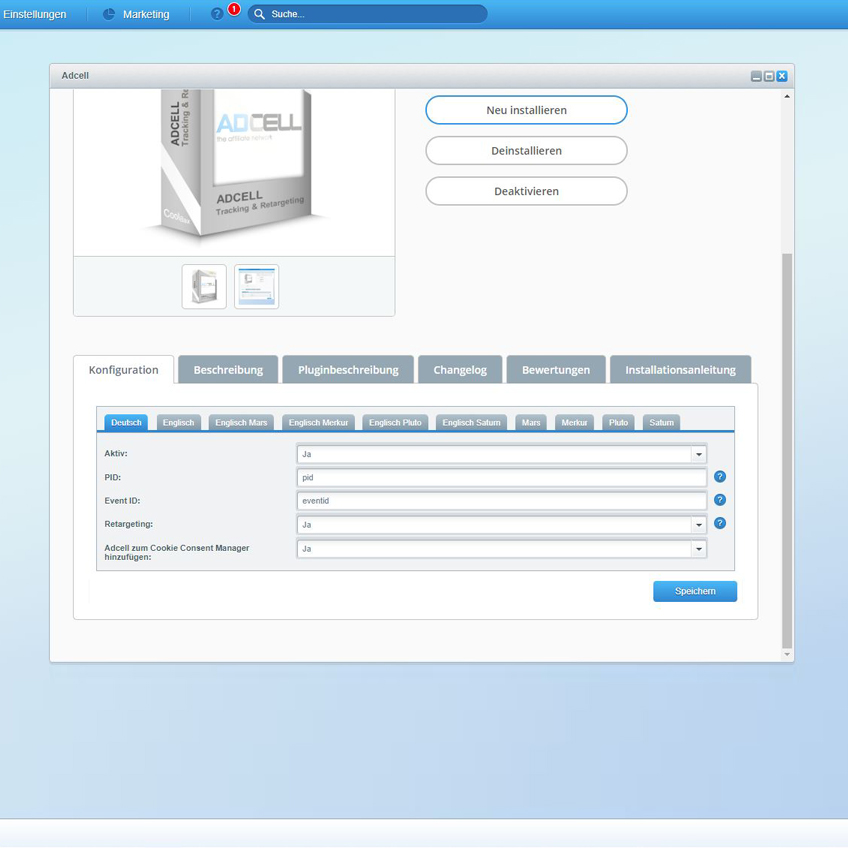
Nach der Installation des Plugins öffnet sich die Konfigurationsmaske des Plugins.
## Die Einstellungen des Plugins
Nach der erfolgreichen Installation des Plugins können Sie in der Konfigurationsmaske die Einstellungen vornehmen und weitere Parameter ergänzen.
| Feldname | Bedeutung |
| -------------------------------------------- | ------------------------------------------------------------------------------------------------------------------------------ |
| Aktiv | Das Plugin für den jeweiligen Shop aktivieren oder deaktivieren. |
| PID | Die PID des ADCELL Konto |
| Event ID | Die Event ID des ADCELL Konto |
| Retargeting | Retargeting aktivieren |
| ADCELL zum Cookie Consent Manager hinzufügen | Kunde kann über die Konfiguration der Cookie-Einstellungen entscheiden, ob er den Cookie von ADCELL zulassen möchte oder nicht |
## Für das Retargeting werden folgende Seiten getrackt
* Startseite
* Suche
* Listing
* Detailseite
* Warenkorb
* Abschluss Seite